Hello,geekhack。
Hello,everyone。
This is Ortho Studio,A customized keyboard studio from China,This is our first time to post an IC on geekhack,It's our great honor. If there are any errors or offences, I sincerely hope for your guidance and understanding.
We are a studio established in China, and we have been working domestically without making much progress abroad.We specialize in keyboards with ortholinear layout,So, unlike other studios, ours is a unique and less popular one.The ortholinear keyboard is relatively unpopular in our country, but we still have a group of like-minded players gathered together. I heard it's quite popular abroad, so today we are officially debuting on geekhack with this keyboard.I hope to make more friends who like ortholinear keyboards and exchange experiences with more customization enthusiasts. Thank you.
Basic Overview
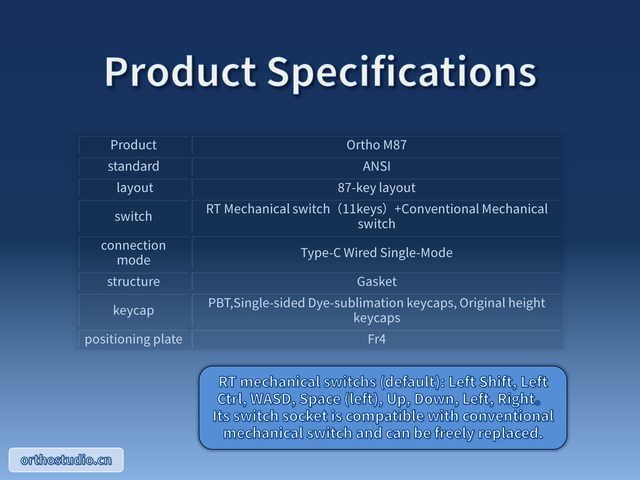
Name and Model:Ortho M87
Layout:80%,TKL
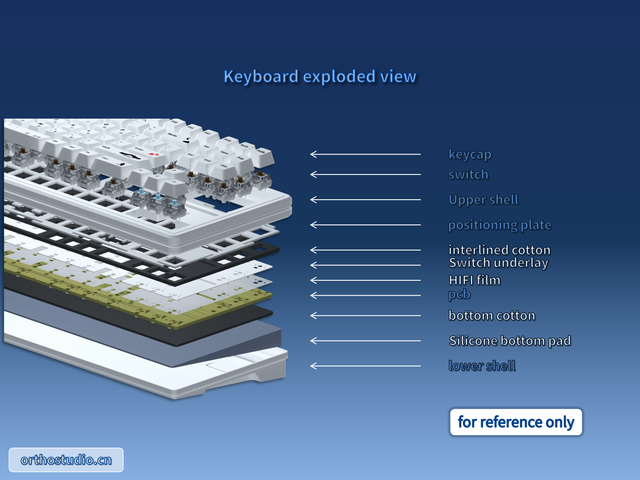
Shell material:ABS
Positioning plate:FR4
PCB:hot-swapping
Distinctive Features
switch:RT Mechanical switch
Layout Arrangement:Ortholinear
Recommended for:
Gaming, students, light office workers, and enthusiasts of special keyboards.
Special note: For heavy typers or those who have poor adaptability to unconventional layouts, please exercise caution, as typing habits are difficult to change, and the muscle memory associated with diagonal layouts can be quite intimidating.
Detailed introduction
Key supplements
Unlike the current oblique layout, each country globally has its own mature standards, while the inline layout has not yet adapted to the standards of various countries. We are currently only displaying the layout according to the ANSI standard, and layouts for other countries are still in the early design stage. Below are some preliminary draft images for your reference only. We welcome friends from all over the world to participate in the discussion and design. Your participation is greatly needed and greatly appreciated. What is displayed here is the hardware standard. Although keycap characters may differ in certain languages, the underlying hardware remains the same.
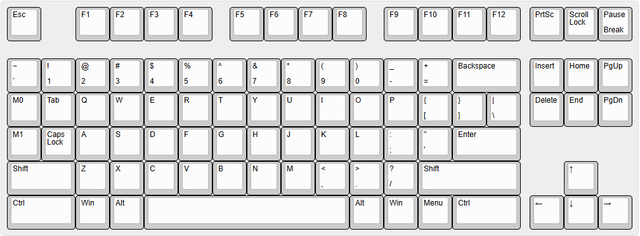
ANSI
This is the standard used by most countries globally. The first batch of people covered by this IC.
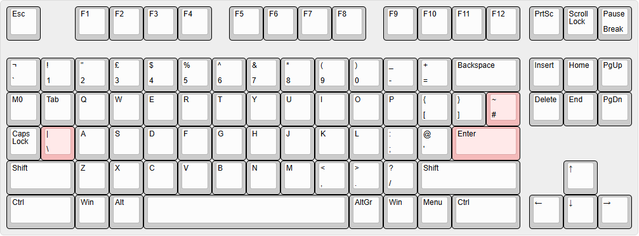
ISO
European and certain national standards. The hardware remains the same across different languages, with minor adjustments to individual letter keys.
Here, I would like to mention that since we are redesigning the inline layout to accommodate all countries, our original design intention is to unify hardware standards globally for shared parts, such as letters, numbers, modifier keys, and other commonly used buttons, trying to standardize their positions and shapes. We hope that everyone around the world, no matter what language they are using the keyboard in or what language the computer is set to, can play CS normally and without any impact. Yes, although we humans may have different languages and typing habits, our habits of playing PC games are the same! We cannot be divided by just one tool for playing games! We have the right to reject division and unify our operations.So, okay, let's continue.
Regarding the ISO standard, the special aspect lies in the shapes of the left shift and enter keys.
First, let's talk about the Enter key. In a linear keyboard, if the Enter key is designed to be vertical, its size and feel will be similar to the + key on a small keyboard. We have experienced that, as the most commonly used key, the Enter key designed like this will be relatively small and uncomfortable to use. Therefore, we believe that designing it as a horizontal 2x Enter key like ANSI will provide a better feel and easier compatibility with keycaps (ISO keycaps seem to be fewer than ANSI ones, especially for custom keycaps). From the perspective of keyboard manufacturers, it also reduces one more hardware design difference. Friends who use ISO keyboards are welcome to discuss whether a vertical 2x Enter key or a horizontal 2x Enter key is better.
Secondly, there's the \| key. On a standard keyboard, the left shift key is flanked by a \| key on the right side, which may be uncomfortable for gamers. In most games, the left shift key is an important shortcut key. For someone who is accustomed to the long left shift key, seeing the short one on an ISO keyboard can be quite frustrating. Therefore, we decided to place the \| key to the left of A and move Capslock to the left, replacing a macro key, so as to accommodate the usage habits of ISO users as much as possible. Here's another issue: some games now use Capslock as a shortcut key, which is another inconvenience for some players. Should we place the \| key to the left of Capslock? This would be uncomfortable for users who type or write code, as they would have to press Capslock and then press \|. Alternatively, users could make the switch themselves, or set the shortcut key originally on Capslock to the \| key in the game settings during gameplay. Another design idea is to split a key to the left of the right shift key and place the \| key there. However, there's a minor issue with this, which will be explained below.
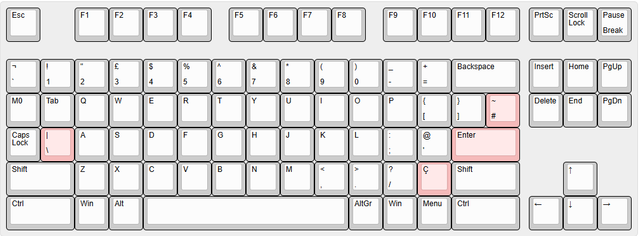
Brazilian Portuguese Keyboard Standard,ABNT2
Yes, the right shift position is used on Brazilian Portuguese keyboards. Brazilian Portuguese keyboards are a hardware branch of ISO, which, on the original basis, divides the right shift key into a dedicated key for Ç. If the ISO keyboard above uses the right shift key to divide the |\ key, then where should the Ç key of the Brazilian Portuguese keyboard be placed? Should it be placed on the capslock key? Or should we simply find another location? Should we divide a key from Backspace and place it to the left of Backspace? That seems to work as well. Friends who use Brazilian Portuguese keyboards are welcome to discuss. Speaking of Backspace, the next topic is another keyboard hardware standard.
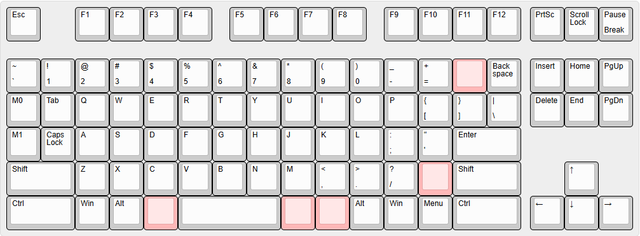
Japanese keyboard standard
Japanese keyboards are quite unique, having five additional keys compared to ANSI. However, it is relatively simple to change to a straight-row layout, as the keys can be arranged in their original positions without much modification. Moreover, even with the addition of five keys, the two macro keys on the left side can still be ensured. ISO requires the use of a macro key. For the enter key, it is recommended to unify it to the ANSI horizontal 2u enter. Speaking of Japanese keyboards, there is another similar standard, which will be introduced next.
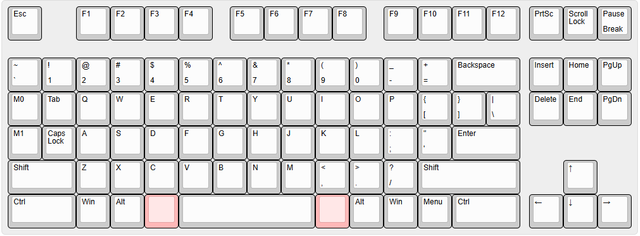
Korean keyboard standard
Converting a Korean keyboard to a QWERTY layout is straightforward. Simply reduce the space by 2 key positions on the ANSI layout, placing a dedicated key on each side. This keyboard may appeal to some users from non-Korean-speaking countries. Explanation follows
It can be observed that the keyboard spaces in Japan and South Korea are slightly smaller. Fortunately, compared to ANSI and ISO, the left side of the space bar is only shortened by 1u of key spacing. For gamers, the impact is minimal. Most players typically place their thumbs under the V and B keys when playing games. While there may be slight variations depending on individual hand sizes, the overall impact on gameplay feel is negligible. For some ANSI and ISO users who heavily rely on Alt, you may choose to use Korean keyboards for gaming, as Alt can be customized to be located under the C key, which is a significant attraction.
The five basic keyboard hardware standards in the world have been introduced. If there are any others, please feel free to add. I apologize for any omissions
Regarding layout standards, we hope that you will provide more feedback and suggestions. Based on everyone's feedback, we will also try to expedite the shipment of various standard inline keyboards in the future.
Progress of agents
We are currently connecting with agents from various regions. The complete list of agents will be announced before the group purchase begins.
Remarks
This post is only for collecting ICs (Interest Expressions), not for sale.
If the minimum order quantity is met, a formal group-buying post will be published on the group-buying section.
I will keep updating the prototype progress and the feedback collected in this thread.
Welcome to share your thoughts in the comment section! Your reply is very important to us! Thanks again!
About Us
Ortho Studio, An emerging studio specializing in interactive technology products. Founded in Chengdu, Sichuan, China.
Based on users' real usage needs, address users' real pain points, and continuously optimize the human-computer interaction experience.
Website:orthostudio.cn
Email: 571060051@qq.com
QQ group:1134889089
Studio Story
One day ten years ago, I got off work as usual, turned on my computer, and played a favorite game that had long since been discontinued. I am a player who is both bad and loves to play. As usual, after a few rounds, I lost again and felt dejected. People like to make excuses when they lose; they never look for their own reasons. Why can't I always win? It must be the computer's fault! It must be... the computer is too poor, should I upgrade its configuration? Faced with a new problem - money. The issue of money made me point the finger at other directions again. I sat with the patinated keyboard that came with the computer. Right, it's the peripheral problem! It must be... I need to get a better set of peripherals. I need a mechanical keyboard and a gaming mouse. The key is that they are cheap. Compared to upgrading the computer, the cost-effectiveness is too high.
What kind of keyboard should I buy? Looking at the glossy WASD keys, I suddenly had this question. Why are the keys on each row always slightly staggered? Why isn't 'w' directly above 's'? It makes my fingers feel cramped and uncomfortable, seriously affecting my typing skills! It must be... This question once raised lingers in my mind, instantly bringing back distant memories from my school days. Scenes of practicing typing in computer classes flashed through my mind: the densely packed keys, the scrambled letters, the staggered keys, and us raising our heads, desperately practicing and memorizing the keys. The fear of my childhood resurfaced. Why is the 'y' key so far away? Is the 'b' key supposed to be pressed with the left hand or the right hand? The staggered keys always force me to press them to the edge. This damn muscle memory.
My personality can be summed up in one word: stubborn. I inherently resist unreasonable things, which is why I still type with two fingers. In this modern age, why should I be tortured by this crappy keyboard? I quickly started searching for the ideal keyboard in my heart. However, instead of finding the keyboard I was looking for, I discovered a harsh reality: all keyboards today have such a messy and peculiar arrangement of keys, staggered up and down. Disappointed, I stumbled upon some information about custom keyboards, which opened the door to a new world.
That same year, the first orthogonal mechanical keyboard was born! It's a pity to say, the first mechanical keyboard, the first keyboard with aligned keys, was actually made by myself. At that time, there was a very niche keyboard called Planck, but it was too small and too expensive. DIY brings abundance. As time goes by, I become more and more involved in this hobby, and I made many friends in the keyboard community, meeting a group of like-minded players. Ten years have passed, and time keeps moving forward. Maybe it's time to dive into the game and do something small, but perhaps something that can change the world!
Ortho Studio, setting sail!
Studio manager: Leon
Attached are images with text descriptions, which can be manually translated for viewing:
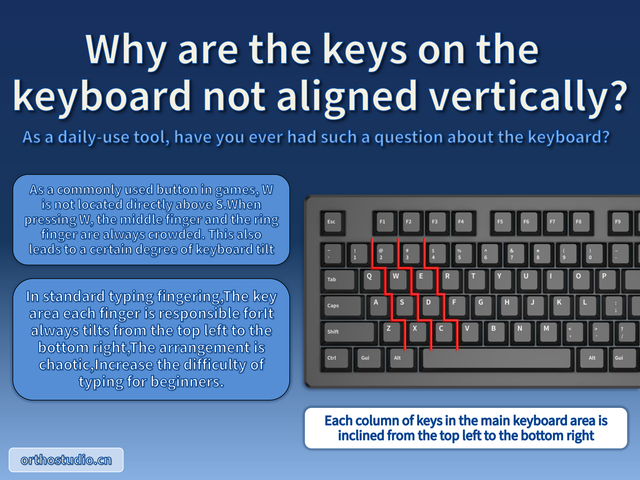
Why are the keys on the keyboard not aligned vertically?
As a daily-use tool, have you ever had such a question about the keyboard?
As a commonly used button in games, W is not located directly above S.When pressing W, the middle finger and the ring finger are always crowded. This also leads to a certain degree of keyboard tilt
In standard typing fingering,The key area each finger is responsible forIt always tilts from the top left to the bottom right,The arrangement is chaotic,Increase the difficulty of typing for beginners.
Each column of keys in the main keyboard area is inclined from the top left to the bottom right
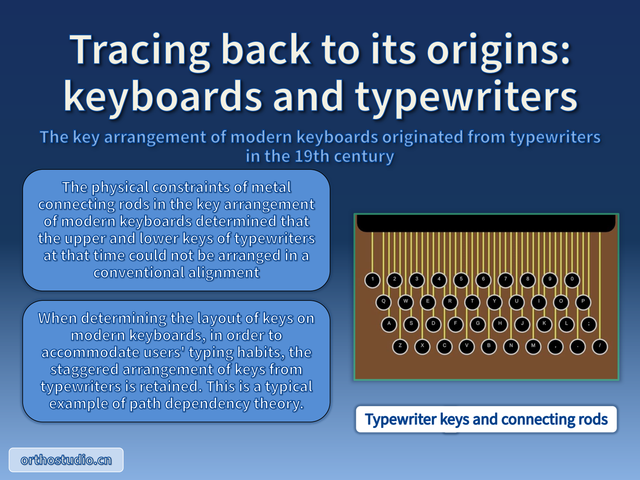
Tracing back to its origins: keyboards and typewriters
The key arrangement of modern keyboards originated from typewriters in the 19th century
The physical constraints of metal connecting rods in the key arrangement of modern keyboards determined that the upper and lower keys of typewriters at that time could not be arranged in a conventional alignment
When determining the layout of keys on modern keyboards, in order to accommodate users' typing habits, the staggered arrangement of keys from typewriters is retained. This is a typical example of path dependency theory
Typewriter keys and connecting rods
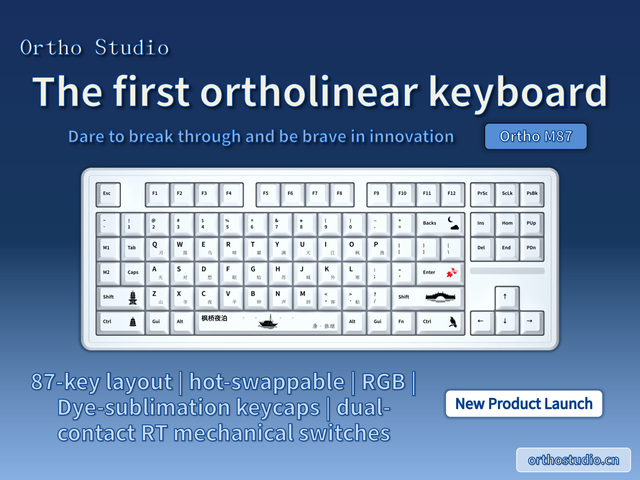
Ortho Studio,The first ortholinear keyboard
87-key layout | hot-swappable | RGB | Dye-sublimation keycaps | dual-contact RT mechanical switches
New Product Launch
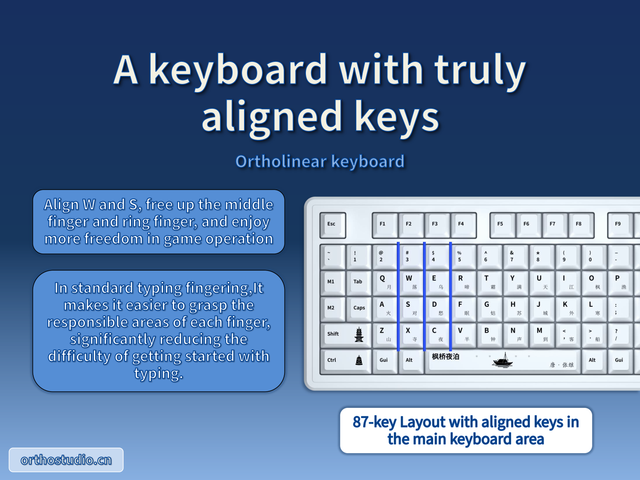
A keyboard with truly aligned keys
Align W and S, free up the middle finger and ring finger, and enjoy more freedom in game operation
In standard typing fingering,It makes it easier to grasp the responsible areas of each finger, significantly reducing the difficulty of getting started with typing.
87-key Layout with aligned keys in the main keyboard area
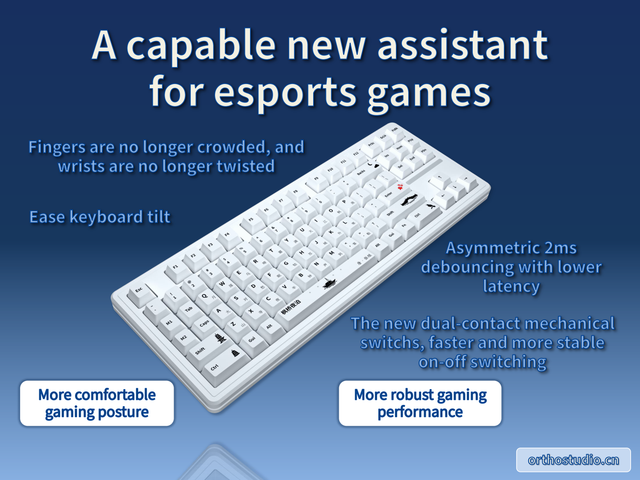
A capable new assistant for esports games
Fingers are no longer crowded, and wrists are no longer twisted
Ease keyboard tilt
Asymmetric 2ms debouncing with lower latency
The new dual-contact mechanical switchs, faster and more stable on-off switching
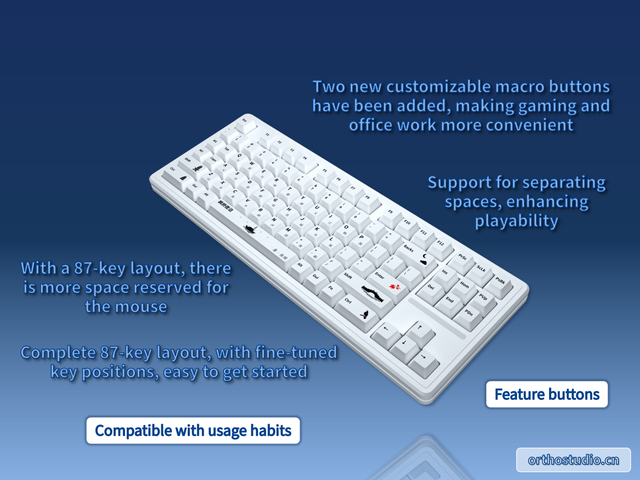
With a 87-key layout, there is more space reserved for the mouse
Complete 87-key layout, with fine-tuned key positions, easy to get started
Two new customizable macro buttons have been added, making gaming and office work more convenient
Support for separating spaces, enhancing playability
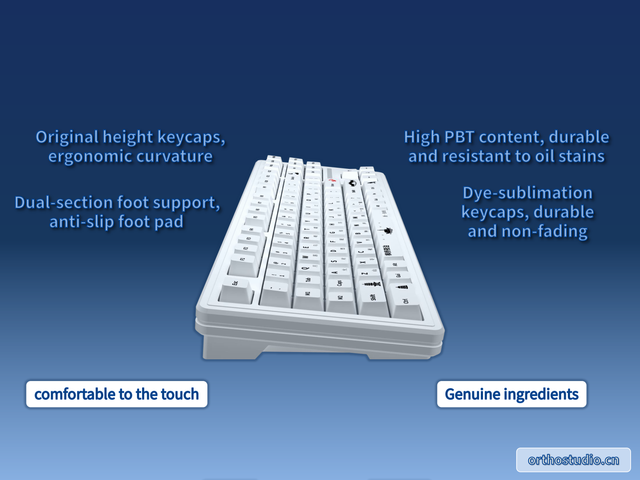
Original height keycaps, ergonomic curvature
Dual-section foot support,
anti-slip foot pad
High PBT content, durable and resistant to oil stains
Dye-sublimation keycaps, durable and non-fading
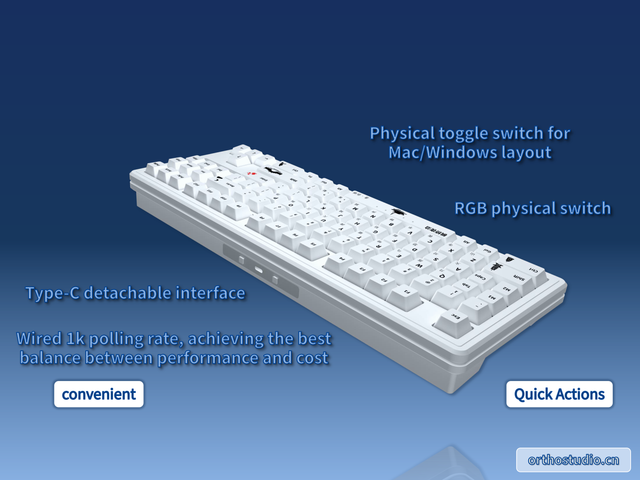
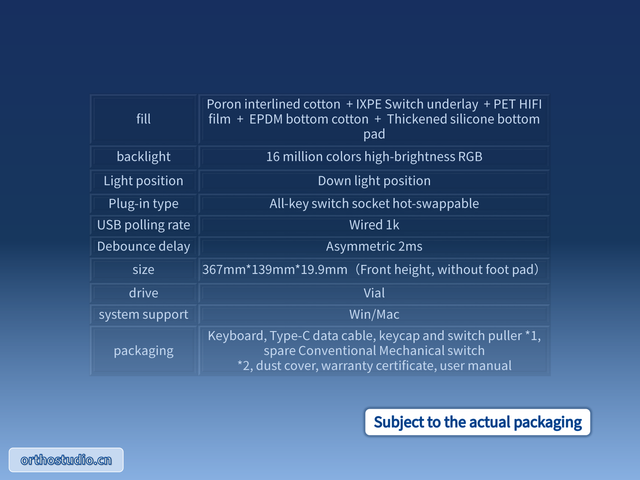
Type-C detachable interface
Wired 1k polling rate, achieving the best balance between performance and cost
Physical toggle switch for Mac/Windows layout
RGB physical switch
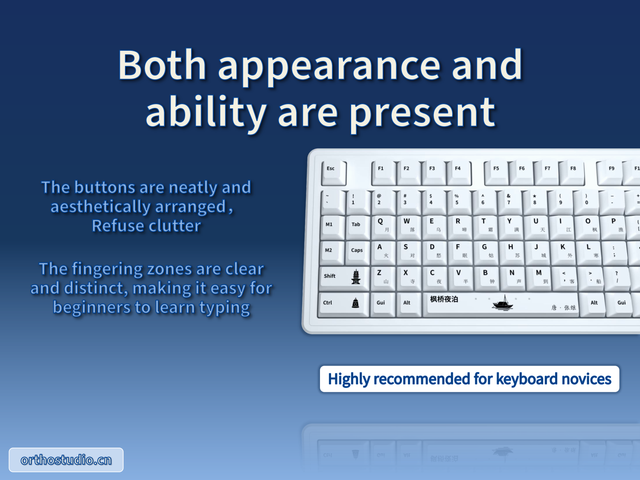
Both appearance and ability are present
The buttons are neatly and aesthetically arranged,Refuse clutter
The fingering zones are clear and distinct, making it easy for beginners to learn typing
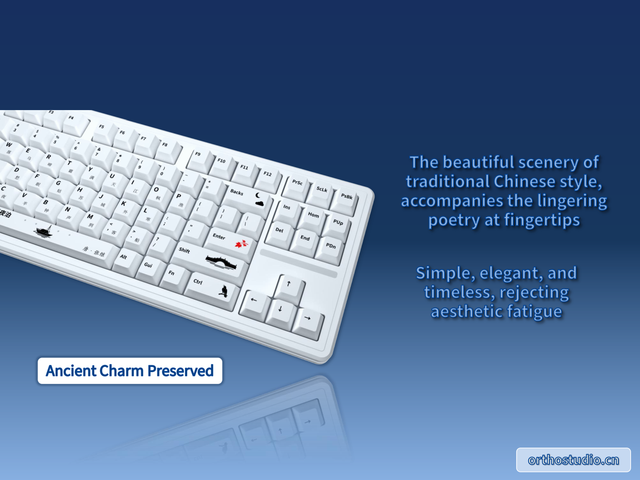
The beautiful scenery of traditional Chinese style, accompanies the lingering poetry at fingertips
Simple, elegant, and timeless, rejecting aesthetic fatigue
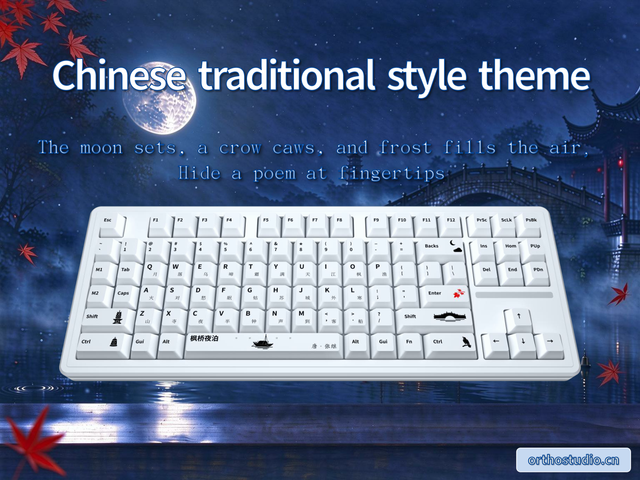
Chinese traditional style theme
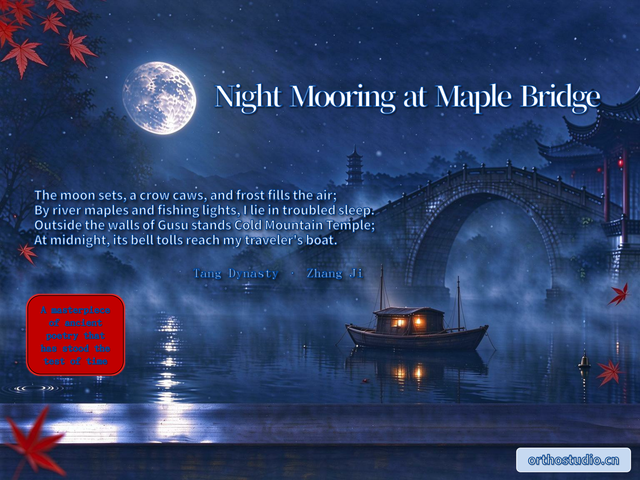
The moon sets, a crow caws, and frost fills the air,Hide a poem at fingertips
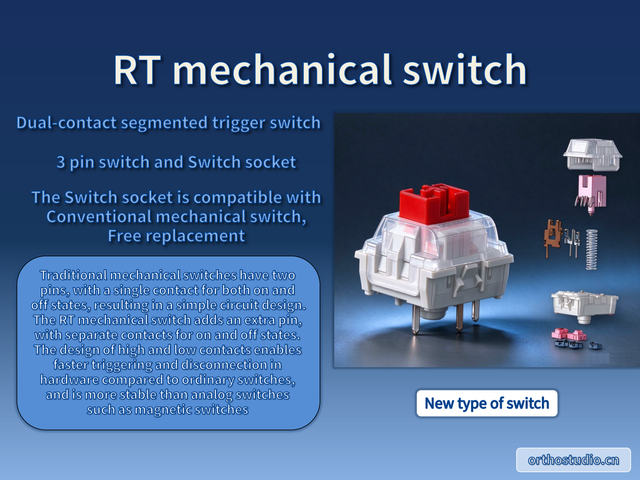
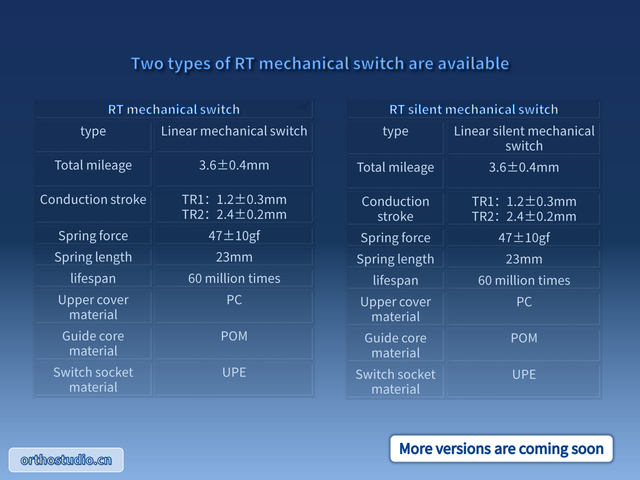
RT mechanical switch
Dual-contact segmented trigger switch
3 pin switch and Switch socket
The Switch socket is compatible with Conventional mechanical switch,
Free replacement
Traditional mechanical switches have two pins, with a single contact for both on and off states, resulting in a simple circuit design. The RT mechanical switch adds an extra pin, with separate contacts for on and off states. The design of high and low contacts enables faster triggering and disconnection in hardware compared to ordinary switches, and is more stable than analog switches such as magnetic switches。
RT mechanical switchs (default): Left Shift, Left Ctrl, WASD, Space (left), Up, Down, Left, Right。
Its switch socket is compatible with conventional mechanical switch and can be freely replaced.


